
Review: Carbide 3D Shapeoko 5.1 Pro

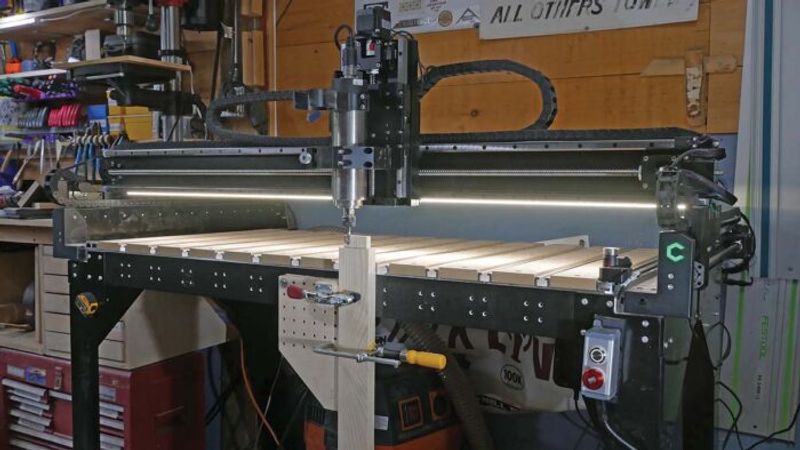
I’ve been using the Carbide 3D Shapeoko 5 Pro for a couple of months now, running it almost every single day. In that time, I’ve put it through its paces across a wide range of tasks: cutting joinery for woodworking projects, flattening boards too wide for my jointer, milling aluminum and UHMW plastic, and even taking on small manufacturing projects like tool handles.
This machine is rock solid. The legs Carbide 3D has added are incredibly sturdy—so much so that I regularly use the CNC as a workbench and have even used it as a platform for hand planing. It doesn’t move or wobble at all. Overall, the build quality is high throughout.
One standout feature for me as a furniture maker is the ability to move the gantry forward past the front of the machine, allowing you to clamp boards on end and machine their faces. While mortises have always been easy to cut lying flat on the bed, being able to cut integral tenons on the end of a board is an absolute game-changer. I’ve now used this machine exclusively for joinery on multiple projects, and while it won’t replace every joinery method in my shop, it is a fully viable option.
Carbide 3D makes two companion pieces of software: Carbide Create (CAD/CAM) and Carbide Motion (machine controller). Both are straightforward, and I think that’s a strength—it makes the machine very accessible and keeps the ecosystem self-contained. When you contact customer support, they can help you with every aspect of the workflow, from file creation to actually running the machine.


Carbide Create handles everything I’ve needed for most projects. I only reach for Fusion 360 when working with files I’ve already built there. The default feeds and speeds are conservative, but you’re more likely to get a successful cut and less likely to break bits. I haven’t broken a single one using their defaults. Not something I can say when left to my own devices with feeds and speeds.
On the other hand, Carbide Motion, the software that controls the machine, feels limited, and I’d like to see more advanced functionality available for users who want it. As my workflows grow more sophisticated, I expect I’ll eventually explore third-party controller software to get back some of the capabilities I’ve been missing. I should note that the Shapeoko isn’t locked down to their software; there is no reason you can’t wander if you prefer another program.

I did run into a wiring issue right out of the box (no fault of the manufacturing), and the customer service experience was honestly one of the best I’ve ever had. I was able to video chat with a support technician who could see exactly what was going on and walked me through the repair in real time. Exceptional.
Be prepared to spend a full day assembling the machine—there’s a lot to it. That said, the process gives you a thorough understanding of how everything works, and I think it’s genuinely worthwhile.
For someone just starting out with CNC, the closed-loop Carbide 3D ecosystem is hard to beat. Everything works as you’d expect it to. I’m very impressed with the Shapeoko 5 Pro, and while I expect to gradually step outside their ecosystem as my needs evolve, this machine has earned a permanent place in my shop.
The ABCs of CNC
Where CNC meets handwork: Owain Harris

3D Printing for Woodworkers
Sign up for eletters today and get the latest techniques and how-to from Fine Woodworking, plus special offers.


